Budget Laptops vs Premium Ultrabooks: Which to Choose
When faced with the decision of selecting a new laptop, the market presents a wide spectrum of options, ranging from highly affordable budget models to sleek premium ultrabooks. The price difference between these categories is substantial, but so are the differences in materials, performance capabilities, and longevity. Understanding what each category offers is essential for making a choice that aligns with your specific needs and usage patterns.
Budget laptops are generally defined by their accessible price points, often targeting students, casual users, and professionals who require basic computing tasks. Premium ultrabooks, on the other hand, command higher prices due to their advanced engineering, lightweight construction, and higher-end components. This article aims to provide a comprehensive comparison of these two laptop categories, focusing on their features, performance, and price, so that you can evaluate which type is more suitable for your circumstances.
The decision between a budget laptop and a premium ultrabook is not solely about cost; it involves a trade-off between immediate affordability and long-term value. By examining the various aspects that differentiate these devices, from build quality to battery life, you can gain a clearer understanding of what to expect from each category and how they align with your daily tasks and computing habits.
Build Quality and Design
One of the most visible distinctions between budget laptops and premium ultrabooks lies in their construction and design philosophy. Budget laptops typically utilize plastic chassis that are thicker and heavier, which keeps production costs down but may result in a less durable and less aesthetically pleasing device. In contrast, premium ultrabooks often feature aluminum or magnesium alloy bodies that are precisely machined, offering a sturdier feel and a more refined appearance. The materials not only affect the look and touch but also contribute to the overall rigidity and resistance to daily wear and tear.
Portability is another significant factor where ultrabooks have a clear advantage. Most ultrabooks are designed to be thin and light, often weighing under three pounds, making them ideal for frequent travelers and professionals who carry their devices throughout the day. Budget laptops, while becoming more portable, generally still weigh more and are thicker, which can be a consideration if mobility is a priority. The compact form factor of ultrabooks also means smaller power adapters and easier fitting into bags, enhancing the overall user experience.
Moreover, the design of the keyboard and trackpad often differs between the two categories. Premium ultrabooks tend to have backlit keyboards with better key travel and tactile feedback, as well as larger, more precise trackpads. Budget laptops might offer basic keyboards that are serviceable but may lack the ergonomic refinements and backlighting. For users who spend extended periods typing, the keyboard quality can be a deciding factor, as it influences comfort and productivity.
Performance and Hardware
When comparing performance, the gap between budget laptops and premium ultrabooks has narrowed in recent years, but distinct differences remain. Budget laptops are often equipped with entry-level processors, such as Intel Core i3 or AMD Ryzen 3, which are sufficient for everyday tasks like web browsing, document editing, and media consumption. However, they may struggle with more demanding applications like video editing, programming, or running multiple virtual machines. On the other hand, premium ultrabooks generally feature higher-end hardware, including Intel Core i5 or i7 processors with vPro technology, faster solid-state drives (SSDs), and sometimes discrete graphics options.
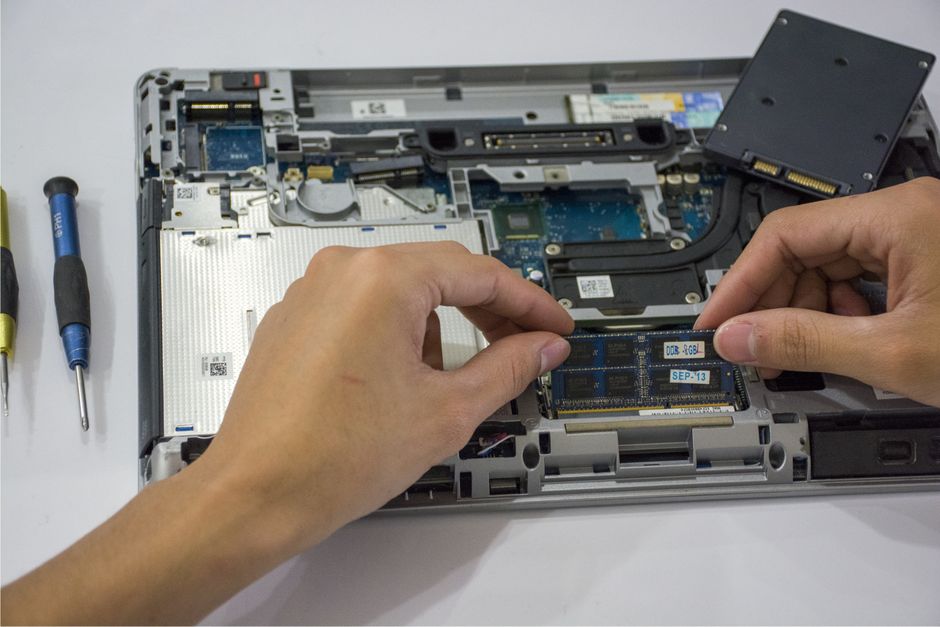
The type of storage also plays a crucial role in perceived performance. While many budget laptops now come with SSDs, they might be slower SATA-based drives or smaller capacity. Premium ultrabooks typically use NVMe SSDs, which offer significantly faster read and write speeds, resulting in quicker boot times and faster application loading. Additionally, ultrabooks often support more RAM—up to 32GB or more—whereas budget models usually cap at 16GB, which can be a limitation for heavy multitasking or future-proofing.
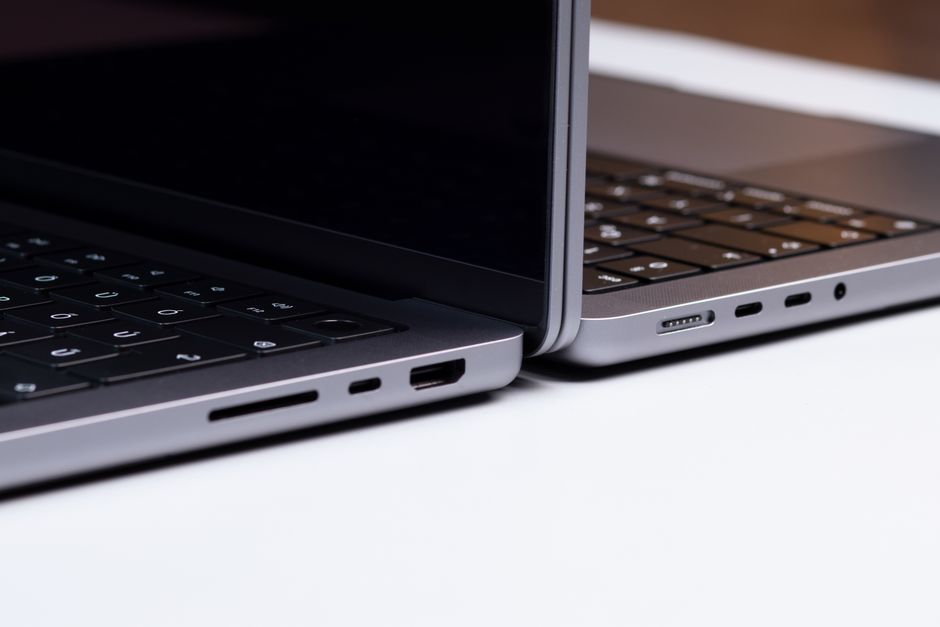
Connectivity and ports are another area of consideration. Budget laptops often include a full set of legacy ports, such as USB-A, HDMI, and an Ethernet port, which can be convenient for connecting older peripherals. Premium ultrabooks, in the pursuit of thinness, may only offer a few USB-C ports requiring adapters. While this aligns with modern standards and allows for Thunderbolt support in many ultrabooks, it can be an inconvenience for users with existing devices. Understanding your peripheral usage is important when evaluating the trade-offs in port selection.
Display and Audio Quality
The display is a critical component that significantly affects the user experience, and there are noticeable disparities between budget and premium laptops. Budget laptops commonly feature 15.6-inch Full HD panels with TN or low-grade IPS technology, which may have limited viewing angles and color accuracy. Premium ultrabooks often boast higher-resolution screens, such as 2K or 4K, with IPS or OLED panels that deliver vibrant colors, deep blacks, and wide viewing angles. For creative professionals or media enthusiasts, the display quality is of utmost importance, as it directly impacts tasks like photo editing and video watching.
Refresh rates and brightness are also areas where ultrabooks excel. Many ultrabooks now offer displays with 90Hz or 120Hz refresh rates, providing smoother scrolling and a more responsive feel, which is beneficial for both productivity and entertainment. Brightness levels are typically higher, reaching 500 nits or more, making the screen legible in brightly lit environments. Budget laptops, on the other hand, often operate at lower brightness, which can be a limitation in outdoor settings or well-lit offices.
Audio quality is another differentiator, albeit less critical for many users. Premium ultrabooks often incorporate advanced speaker systems, tuned by brands like Bang & Olufsen or Dolby Atmos, delivering clearer and louder sound. Budget laptops tend to have basic stereo speakers that may sound tinny or lack bass. If you frequently consume media without headphones or participate in video conferences, superior audio can enhance the experience, but it is not a deal-breaker for casual use.
Battery Life and Portability
Battery life is a crucial factor for mobile users, and it is one area where premium ultrabooks generally have a significant advantage. Thanks to power-efficient processors, larger batteries, and optimized design, ultrabooks often achieve over 12 hours of real-world usage on a single charge. This allows users to work through a full day without needing to carry a charger. Budget laptops, with their less efficient components and sometimes smaller batteries, typically offer 6 to 8 hours of battery life, which may be sufficient for a partial day of classes or meetings but can require more frequent recharging.
The efficiency of premium ultrabooks is also evident in their thermal management. They are engineered to run cooler and quieter, with advanced cooling solutions that may include vapor chambers or multiple fans with low noise profiles. Budget laptops, with their simpler cooling systems, may become warm under load and produce more fan noise, which can be disruptive in quiet environments. This aspect not only impacts comfort but also affects the long-term reliability of the device.
However, it is important to note that battery life is influenced by usage patterns and settings. Running demanding applications, increasing screen brightness, or keeping many background processes active will reduce battery endurance regardless of the laptop category. Battery life ratings provided by manufacturers are often based on controlled tests and may not reflect real-world conditions. Therefore, when comparing laptops, it is wise to read independent reviews that measure battery life under typical workloads.
Price and Value Considerations
The most obvious differentiator between budget laptops and premium ultrabooks is the price. Budget laptops typically range from $300 to $600, making them accessible to a wide audience. Premium ultrabooks, however, can start at around $800 and easily exceed $1500, with some high-end configurations costing much more. The higher price of ultrabooks is justified by superior materials, better performance, enhanced portability, and often longer warranty and support options. For individuals with limited budgets, a budget laptop may be the only viable choice, but it is essential to consider the total cost of ownership, including potential upgrades or earlier replacements due to slower performance.
Value is subjective and depends on how the laptop will be used. If your primary activities are word processing, internet browsing, and streaming videos, a budget laptop might fulfill all your requirements without breaking the bank. In such cases, spending extra for a premium ultrabook may not yield noticeable benefits for your specific tasks. Conversely, if you are a business professional who travels frequently, attends meetings, and relies on your laptop for presentations and meetings, the portability, battery life, and build quality of an ultrabook may be worth the investment. The decision should be based on a careful assessment of your needs and the importance you place on aspects like weight, performance, and durability.
It is also worth considering the longevity of the device. Premium ultrabooks, with their higher-end components and better build quality, often have a longer usable life. They may support newer software updates for a longer period and feel less outdated over time. Budget laptops, while adequate initially, may struggle to keep up with evolving software demands, leading to a shorter lifespan before an upgrade becomes necessary. Thus, while the initial cost of a budget laptop is lower, the cost per year of use might be comparable or even higher if it needs to be replaced more frequently.
The choice between a budget laptop and a premium ultrabook ultimately hinges on a balance of priorities. Evaluating your computing habits, mobility needs, and budget constraints will guide you towards the category that best matches your expectations.
Making the Right Choice
To make an informed decision, start by listing the tasks you perform regularly on a laptop. If your routine includes heavy multitasking, creative applications, or software development, the enhanced processing power and memory of an ultrabook may be beneficial. If your usage is more moderate, such as browsing, email, and document editing, a budget laptop may suffice. Also, consider where you will use the laptop: if it will primarily remain on a desk at home, portability might be less critical, while a device for frequent travel should be lightweight and have good battery life.
Think about the ecosystem and operating system you prefer. Budget laptops are often available with Windows, Chrome OS, or Linux, while premium ultrabooks are more commonly found with Windows or macOS (in the case of MacBook Air). Your familiarity with and preference for a particular operating system can influence your choice, as it affects the availability of software and the overall user experience.
Additionally, factor in the total cost of ownership, including accessories, warranties, and potential repairs. Premium ultrabooks often come with better warranty coverage and premium customer support, which can be valuable if you encounter issues. Budget laptops may have more limited support but often offer cheap upgrade options, such as adding more RAM or swapping the storage drive, which can extend their usefulness.
Ultimately, there is no universally correct answer; the best laptop for you depends on your individual circumstances. By weighing the pros and cons of each category against your specific needs, you can select a device that provides the functionality you require at a price you can afford. It is recommended to test laptops in person whenever possible to gauge build quality, keyboard comfort, and display characteristics, as these aspects are often subjective and best assessed firsthand.